
I used to research topics the way most people do. Open twenty tabs. Skim articles. Copy-paste quotes into a doc. Ask ChatGPT with manually pasted context. Bookmark things I’d never come back to. Lose half of it in a Slack thread.
Then Google launched NotebookLM publicly in late 2023, and I started using it almost immediately. Something changed. Not because the AI was smarter. Because the workflow was different.
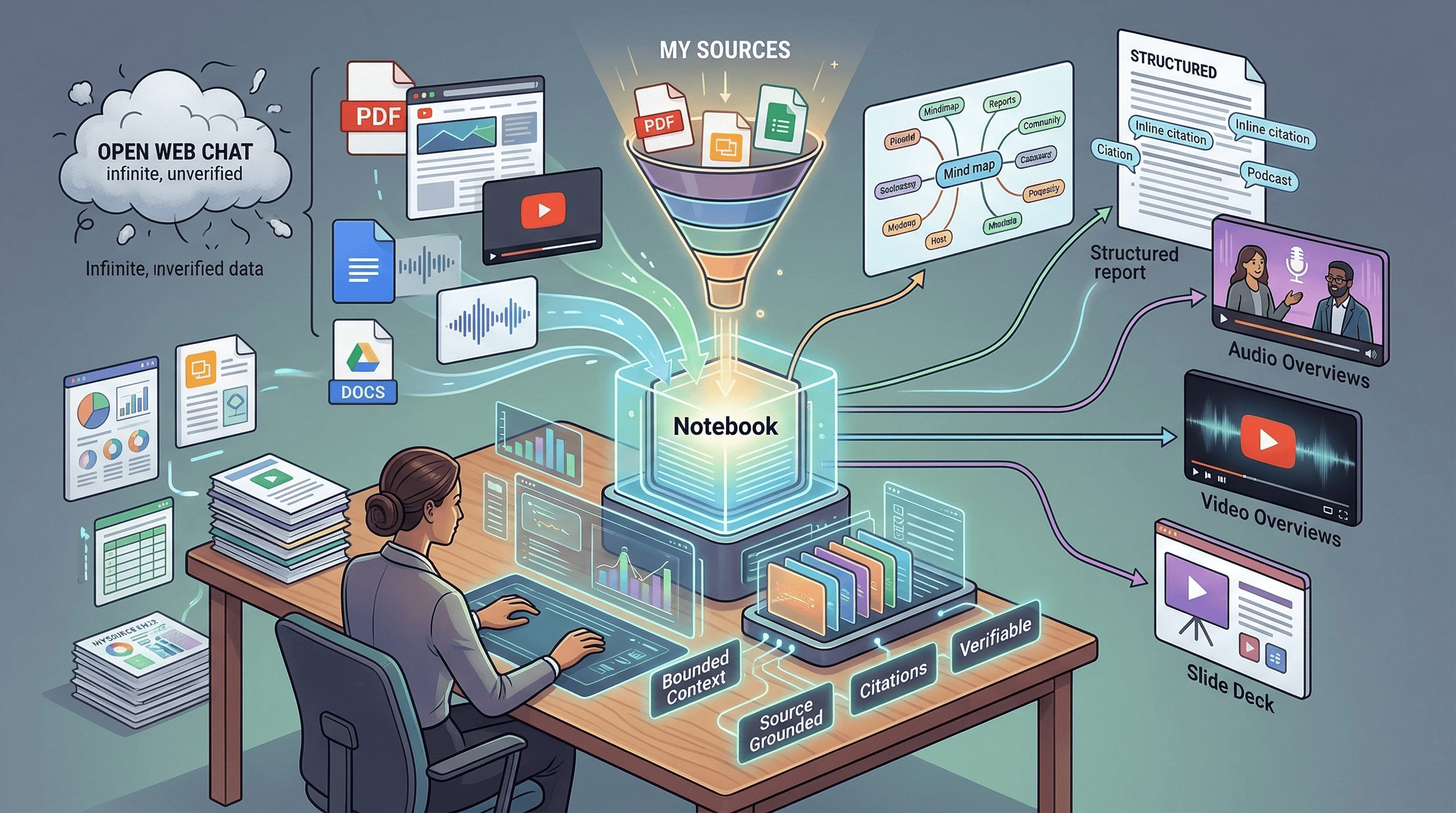
Instead of starting with a blank chat box and hoping the model knows what I need, I start with the material. PDFs, articles, YouTube videos, docs. I load them into a notebook, close the boundary, and say: help me think through this.
I’ve always been fast. I’ve always used every tool available to squeeze more out of my research and my work. But NotebookLM hit different. It was like strapping a missile to a process I already thought was optimized. The first time I shared an Audio Overview with a colleague, they didn’t believe it was AI-generated. The first time I turned a pile of research into a briefing for leadership, it took hours instead of days. The first time I used it to evaluate a new technology for my team, I realized that even my “fast” had been leaving speed on the table.
NotebookLM isn’t a chatbot. It’s a research workbench. And I think it’s one of Google’s best products.
Why constraints make AI better#
Here’s the counterintuitive thing. Most AI products are racing to give you more. More context window. More tools. More access to the open web. More everything.
NotebookLM went the other direction. You give it a bounded set of sources. It works only within that boundary. If the answer isn’t in your material, it may simply not answer.
That sounds like a limitation. It’s actually what makes it useful.
When an AI has access to everything, it can hallucinate confidently from anywhere. When it’s constrained to your sources, the answers get grounded. The citations become verifiable. You can click through to the exact passage and check what it said. The AI stops trying to be smart about everything and starts being useful about the specific thing you’re working on.
I’ve been writing about this principle in the context of engineering teams. AI agents that work with curated knowledge produce better code than agents with unlimited context windows. NotebookLM proves the same thing from a completely different angle: bounded context beats unlimited context. Every time.
How I actually use it#
My workflow now has three modes.
Research for writing. Before I write an article, I build a notebook. I dump every relevant source I can find: documentation, blog posts, Hacker News discussions, official announcements, technical deep dives. Then I interrogate the notebook. What are the key architectural decisions? What are people actually saying about this? What are the tradeoffs nobody mentions in the marketing? The notebook gives me grounded answers with citations I can verify. It compresses what used to take days of reading into hours of focused work.
Technology evaluation for work. When I need to evaluate a tool or approach for my team, I load the docs, the GitHub discussions, the community feedback, and any relevant technical papers into a notebook. Instead of forming an opinion from skimming, I can systematically ask questions across all the material at once. What are the real scaling concerns? What do production users actually complain about? Where does the marketing diverge from reality?
Learning new domains. When I need to get up to speed on something I don’t know well, NotebookLM is the fastest path I’ve found. Load the best sources, ask questions, get answers grounded in the material. It’s like having a study partner who actually read everything.
The outputs are where it gets interesting. I don’t just use the chat. I generate Audio Overviews and share them with colleagues who don’t have time to read a 40-page doc. I create briefings for leadership. I turn research into slide decks for presentations. Different people consume information differently, and NotebookLM lets me transform the same source material into whatever format lands best.
What it can do (beyond chat)#
The feature surface is much broader than most people realize.
Audio Overviews. The signature feature. It generates podcast-style audio from your sources in formats like Deep Dive, Brief, Critique, and Debate. There’s an interactive mode where you can interrupt the hosts with your voice. When it works, it turns a stack of PDFs into something you can listen to on a walk. I share these constantly and the reaction is always the same: people can’t believe it’s generated from documents.
Video Overviews. Standard and Cinematic versions. The March 2026 update added Cinematic Video Overviews using the latest Google models. They take time to generate but the ability to turn research into a visual briefing is unique.
Study and synthesis outputs. Notes, reports, mind maps, data tables, flashcards, quizzes, slide decks, infographics. Reports export to Google Docs, data tables to Sheets, decks download as PDF or PowerPoint.
Discover Sources and Deep Research. NotebookLM is no longer only “bring your own documents.” Discover Sources lets you describe a topic and pull relevant web sources in. Deep Research can browse hundreds of websites and produce a source-grounded report that drops into the notebook.
Mobile app with offline listening. Background and offline Audio Overviews on your phone. This is what pushed it from “browser tool” to something I use throughout the day.
Where it frustrates me#
I wouldn’t trust this article if I only said nice things. Here’s what actually bothers me.
You can’t tune the outputs. This is my biggest frustration. When an Audio Overview or a summary isn’t quite right, you can’t easily adjust it. The voices are limited. The styles are limited. You can regenerate, but you can’t say “keep everything except change this part” or “use a different tone for this section.” For a product that’s all about transformation, the lack of fine-grained control over the transformations feels like a gap.
Notebooks are isolated. Each notebook is its own world. You can’t cross-reference between notebooks or build connections across research projects. If you’re working on related topics, you end up duplicating sources or maintaining parallel notebooks that don’t talk to each other.
Sources are static copies. When you import a file, NotebookLM takes a snapshot. If the original changes, you need to re-import manually. For fast-moving research where docs update weekly, this creates drift between your notebook and reality.
The audio quality critique is fair. Some people say the hosts sound superficial or padded with filler. I don’t always agree, but the criticism isn’t baseless. The output quality varies by source material, and there are patterns that start to feel repetitive once you’ve generated enough overviews.
It’s Google’s infrastructure, not yours. Your data lives on Google’s servers. When you submit feedback, Google may collect your prompts, sources, and outputs for up to three years. Workspace users get stronger protections, but this is still a vendor-hosted system. If that’s a dealbreaker, self-hosted alternatives like Open WebUI or AnythingLLM exist for a reason.
How it compares to what’s out there#
NotebookLM’s real competitors aren’t ChatGPT and Claude. Those are general-purpose assistants that happen to accept files. The real comparison is against research-specific tools.
Perplexity is search-first. Great for finding information. NotebookLM is notebook-first. Better when you already have the information and need to understand it.
Elicit specializes in systematic screening and data extraction from scientific papers. Sharper for academic literature review. NotebookLM is broader in source types and output formats.
Scite does contextual citation intelligence. It tells you whether a paper was supported, contradicted, or merely mentioned. A fundamentally different kind of analysis that NotebookLM doesn’t attempt.
Notion AI and Obsidian are note-taking tools with AI added. They make your existing notes smarter. NotebookLM starts from the sources, not from your notes. Different starting points, different outcomes.
Open Notebook and NotebookLlaMa are the open-source alternatives for anyone who needs privacy or provider control. They win on flexibility. NotebookLM wins on polish and integrated UX.
Where does ChatGPT fit? It’s not really a competitor. It’s the broader AI layer. Gemini Deep Research can even use NotebookLM notebooks as sources. That tells you where Google sees the relationship: Gemini is the general assistant, NotebookLM is the close-reading workbench inside the wider stack.
The bigger lesson#
Here’s what I keep coming back to.
The AI industry is obsessed with making models bigger, context windows longer, and tools more general. Every product wants to do everything for everyone. More tokens. More tools. More capabilities.
NotebookLM went the other way. One notebook. Your sources. Help you think.
And it works better than the general-purpose tools for the specific job it does. Not because the underlying model is better. Because the constraints are better. When the AI can’t wander off into the internet, it stays focused. When every answer has to cite a source, the hallucinations drop. When the unit of work is a bounded notebook, the outputs feel coherent instead of scattered.
There’s a lesson in that for anyone building AI tools, or for anyone deciding how to use AI in their work. Sometimes the most powerful thing you can do with AI isn’t giving it access to everything. It’s giving it the right boundaries.
The teams I work with are learning the same thing. AI agents with curated knowledge bases outperform agents with unlimited context windows. NotebookLM proves the principle from the consumer side: give AI the right constraints, and it will give you better answers than any amount of raw capability.
Stop asking AI to know everything. Start asking it to know the right things.
Using NotebookLM for research or work? I’d love to hear what your workflow looks like. Find me on X or Telegram.