
Here’s a question nobody’s asking: who owns the layer between your engineers and the AI models they use every day?
Right now, for most teams, the answer is OpenAI. Or Anthropic. Or Google. Your engineers open ChatGPT, or Claude, or Gemini, and they work inside someone else’s product. Someone else’s UI. Someone else’s data policies. Someone else’s feature roadmap.
That’s fine when AI is a nice-to-have. It stops being fine when AI becomes how your team actually works.
Open WebUI is the project that makes this question real. Not because it’s a better chatbot. Because it turns the AI interface layer into infrastructure you can own, deploy, and control. And once you understand what that means, the conversation about AI tooling changes completely.
What Open WebUI actually is#
Strip away the GitHub stars (128k+ and counting) and the marketing language about “bringing intelligence home.” What you’re looking at is a self-hosted control plane for AI models.
It runs in a container. Docker, Kubernetes, Podman, Helm, whatever your infra looks like. First account becomes admin. Later signups need approval. For a solo setup you can disable login entirely. One container, local storage, browser UI. You’re up and running.
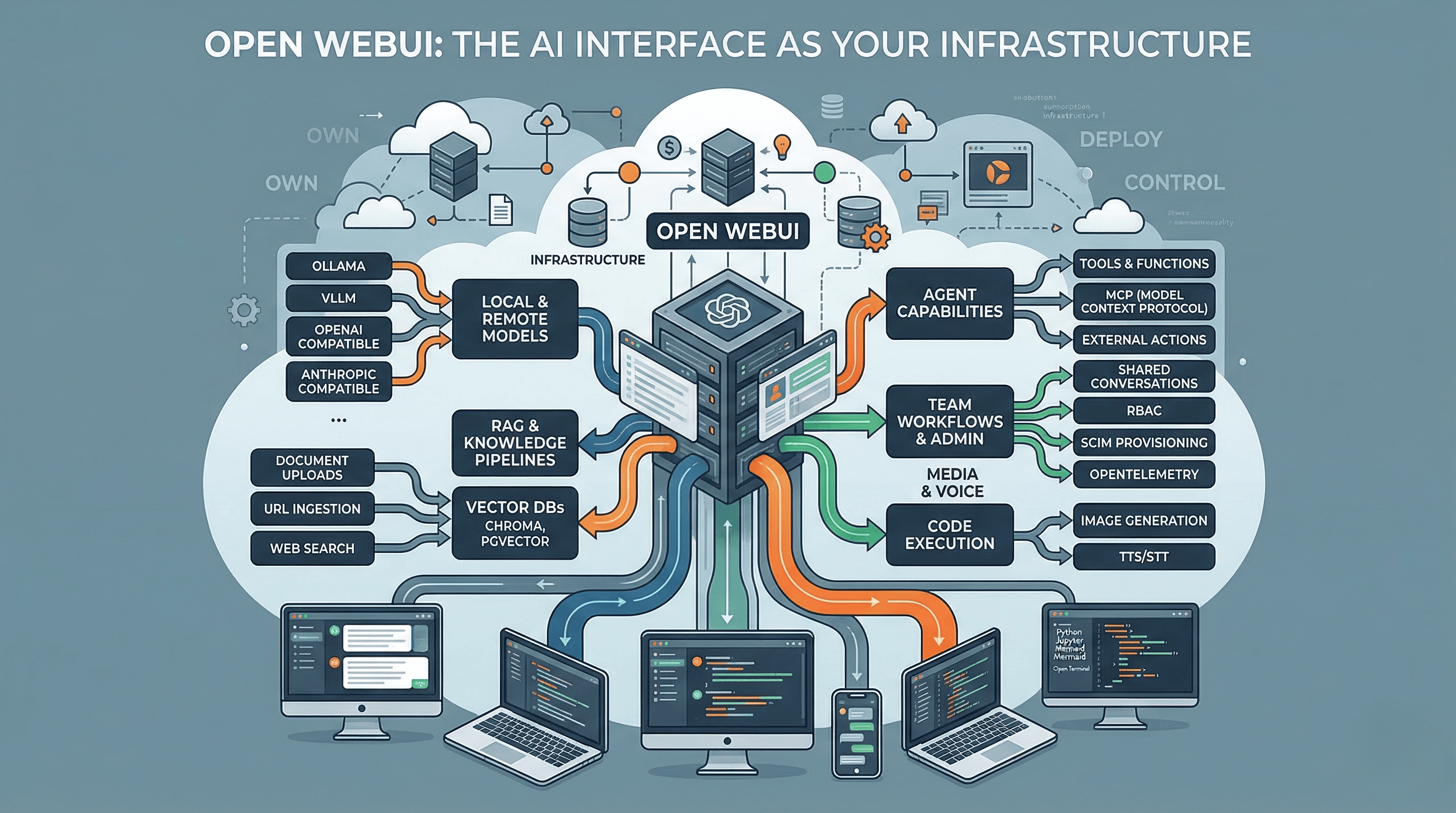
But the interesting design decision is that it’s protocol-first, not vendor-first. Open WebUI uses OpenAI Chat Completions as the shared language across providers. It has compatibility layers for Anthropic. It supports Ollama for local models. It can route to any OpenAI-compatible backend. That makes it less like “an Ollama UI” and more like an operations layer sitting above whatever models you choose to run.
This is the same architectural pattern we’ve seen play out in infrastructure before. Think about how Terraform became the control plane above cloud providers, or how Kubernetes became the orchestration layer above compute. Open WebUI is making that same move for the AI interface layer.
What it can actually do (beyond chat)#
Most people discover Open WebUI because they want a local ChatGPT. Then they realize the feature surface is much wider than they expected.
RAG and knowledge work. Multiple vector databases, document uploads, URL ingestion, web search across 15+ providers, and full-page URL fetching. This isn’t a toy retrieval setup. It’s a real knowledge pipeline.
Agent capabilities. Open WebUI distinguishes between Tools, Functions, and Pipelines. It supports MCP natively. It can attach external actions like search, scraping, image generation, and voice. It can expose MCP through OpenAPI-compatible flows. This is an agent platform, not just a chat box.
Code execution. Python through Pyodide or Jupyter, Mermaid rendering, interactive artifacts. At the extreme end there’s Open Terminal, which gives the model a real OS-level environment in a container. That’s powerful and terrifying in equal measure.
Team workflows. Folders, projects, chat history, shared conversations, channels for multi-user collaboration, RBAC, SCIM provisioning, OpenTelemetry. The admin surface is deeper than most people expect from an open-source project.
Media and voice. Image generation and editing, speech-to-text and text-to-speech with local, browser, and remote options.
The feature list is impressive. But feature lists are easy. The real question is what happens when you actually run it.
The reality of running it in production#
For a hobbyist or solo developer, Open WebUI is deceptively simple. Container up, connect a model, start chatting.
For production, the defaults are just defaults. Out of the box you get SQLite, embedded ChromaDB, and one Uvicorn worker. That’s fine for one person. The moment you want multi-worker or multi-node deployment, the project tells you to move to PostgreSQL with PGVector, Redis for caching, and shared storage. Easy to start. Not magically “no-ops” once it matters.
If you use RAG heavily, the reality gets sharper. The project’s own scaling guide warns that the default PDF extractor and default embedding path are common causes of memory leaks and RAM blowups at scale. They explicitly recommend externalizing them in production.
I’m not saying this to dismiss the project. I’m saying it because this is exactly the kind of detail that separates “I read the feature list” from “I actually deployed it.” If you’re considering Open WebUI for your team, go in with eyes open. This is infrastructure. Infrastructure requires ops.
Who’s behind it and why that matters#
Open WebUI is led by founder Tim J. Baek and backed by Open WebUI, Inc. The team page credits community contributors, but the organization is explicit that it’s not looking for outside governance advice. This is founder-led open source, not a neutral foundation-governed commons.
Why does that matter? Because the business model is visible in the decisions.
Since version 0.6.6, the project added a branding-protection clause for larger deployments. Code up to v0.6.5 remains under the original BSD-3 terms. Enterprise offerings include theming, SLAs, LTS, and direct support. This is the standard playbook: open core with enterprise upsell.
The community has opinions about this. Some people on Hacker News get sharp about the licensing change and the fact that a project called “Open” WebUI has branding restrictions. Others say they don’t care because they’re not planning to fork it anyway.
My take: this is a normal and healthy tension. Building sustainable open-source software costs money. Branding protection is one of the less invasive ways to fund it. But if you’re betting your team’s AI infrastructure on this project, you should understand the governance model you’re buying into.
The security conversation nobody wants to have#
Here’s the uncomfortable part.
Open WebUI’s Tools, Functions, Filters, Pipes, and Pipelines execute arbitrary Python on your server. The docs say “only install from trusted sources.” That’s honest, but it also means the extension system is a real attack surface.
This isn’t theoretical. A code-injection issue in Direct Connections was patched in 0.6.35. An SSRF issue in retrieval processing was patched in 0.6.37. Both are the kind of vulnerabilities that come with running user-extensible systems.
For your team, this means treating Open WebUI the same way you’d treat any infrastructure component: pin versions, review extensions, monitor for CVEs, control who can install what. The freedom to extend the platform comes with the responsibility to secure it.
Why teams and orgs actually adopt this#
Features are nice. But nobody migrates their AI tooling because of a feature checklist. They do it because something about the current setup is broken. I spent time researching the best tools for an internal ChatGPT alternative, talking to other engineering leaders who did the same. Here’s what actually drives the decision.
Cost visibility and control. When your team uses ChatGPT or Claude directly, every person needs a subscription. Or worse, everyone shares credentials. Or worst of all, engineers use their personal accounts and company data flows through consumer products with consumer privacy terms. With Open WebUI in front of your API keys, you get one set of credentials, usage tracking per user, and the ability to route different workloads to different models based on cost. Need a quick answer? Route to a cheap local model. Need deep reasoning? Route to Claude or GPT. Same interface, conscious cost allocation.
Data stays where you decide. For a lot of orgs this is the whole conversation. Regulated industries, government contracts, security-conscious startups. The moment your engineers paste proprietary code into ChatGPT, you have a data governance problem. Self-hosting the interface layer means the data flows through your infrastructure, your logging, your retention policies. You can run sensitive workloads on local models that never leave your network, and routine tasks on cloud APIs. Same UI for both.
No vendor lock-in on the workflow layer. This is the one that hits engineering leaders hardest. Today your team builds workflows, prompt libraries, knowledge bases, and habits around ChatGPT. Tomorrow OpenAI changes the pricing, kills a feature, or deprecates a model. Everything you built around their interface is tied to their decisions. When the interface is yours, the models are pluggable. You can switch from GPT to Claude to Gemini to a local model without retraining your team or rebuilding your workflows.
Unified AI experience across the org. Instead of some engineers using ChatGPT, some using Claude, some using local models, and nobody sharing anything, everyone works through one interface. Shared conversations, shared knowledge bases, shared tools. New team member joins, gets access to the same AI setup as everyone else. That might sound like a small thing until you’ve managed an engineering org where every person has their own disconnected AI workflow and none of that institutional knowledge is captured anywhere.
A real sandbox for innovation. Want to test a new model? Add it as a backend. Want to build a custom agent for your team? Use the extension system. Want to integrate your internal knowledge base? Plug in RAG. Want to give your AI access to your tools via MCP? It’s supported. You don’t need to wait for OpenAI or Anthropic to ship a feature. If you can build it, you can plug it in. For teams that move fast, that’s the difference between waiting for a vendor’s roadmap and building what you need right now.
None of this is free. You trade managed simplicity for operational responsibility. But for teams that are serious about AI being part of how they work, not just a tool they occasionally open, owning the interface layer starts making a lot of sense.
How it compares to the incumbents#
The comparison isn’t really about features. It’s about what you’re optimizing for.
Versus ChatGPT. ChatGPT has Projects, Deep Research, Apps, Company Knowledge, and mature business controls. SSO, retention policies, permissions, training defaults. It’s zero-ops SaaS. Open WebUI’s advantage is that you own the stack. Data stays local. You mix local and remote models. You’re not locked to one vendor’s interface. If zero-ops matters most, ChatGPT wins. If ownership matters most, Open WebUI wins.
Versus Claude. Claude has Artifacts, Projects, Skills, Research, and Google Workspace integration. Anthropic also created MCP. Open WebUI can route to Claude’s models, but Anthropic’s own docs note that their OpenAI-compatible endpoint is mainly for testing, and the native API is recommended for the full feature set including PDF processing, citations, extended thinking, and prompt caching. Protocol compatibility is powerful, but it flattens vendor-specific superpowers.
Versus Gemini. Gemini is strongest when your work already lives in Google’s ecosystem. Deep Research can pull from Search, Gmail, Drive, and NotebookLM. Open WebUI is the better fit if you want one interface above Google models, Anthropic models, OpenAI models, local models, and whatever comes next.
The pattern is consistent: the SaaS products win on managed experience and vendor-native depth. Open WebUI wins on control and independence. Neither is wrong. They’re different bets.
How it compares to open-source alternatives#
The open-source landscape is more nuanced.
LibreChat is probably the closest direct competitor. Agents, MCP, artifacts, code interpreter, broad provider support. It reads like the closest open-source answer to the mainstream chat products. Open WebUI feels more infrastructure-oriented, more invested in deployment patterns, admin controls, and the local/offline story.
AnythingLLM leads with “chat with your docs.” Built-in agents, multi-user support, vector databases, document pipelines, no-code agent builder. If your center of gravity is private documents and internal knowledge workflows, AnythingLLM has a clear story. Open WebUI is broader if you want one extensible front end for many kinds of AI workflows.
Onyx is enterprise-search-heavy. Connectors, synced knowledge sources, deep research, MCP, enterprise knowledge grounding. Compelling when “AI over company knowledge” is the main requirement. Open WebUI is a general AI workspace. Onyx is sharper as an enterprise retrieval layer.
Jan is desktop-first and personal. 100% offline, runs on your laptop, turns it into an AI workstation. Great for single-user local AI. Open WebUI becomes more compelling the moment you want browser access, shared workspaces, or team deployment.
What this actually means for engineering leaders#
Here’s the strategic point that matters more than any feature comparison.
For the last two years, the AI interface layer has been bundled with the model provider. You use ChatGPT because you want GPT. You use Claude because you want Anthropic’s models. The interface and the intelligence came as a package deal.
Open WebUI (and projects like it) are unbundling that. The model is one layer. The interface is another. And once those layers separate, the dynamics change.
Your team can switch models without switching workflows. You can run sensitive workloads on local models and routine work on cloud APIs, through the same interface. You can add RAG, agents, and custom tools without waiting for OpenAI to ship them. You can audit, log, and control every interaction.
The price of that freedom is real. You own deployment. You own patching. You own extension security. You own operational tuning. You inherit everything that SaaS normally hides behind a login page.
That’s not a reason to avoid it. It’s a reason to approach it the way you’d approach any infrastructure decision: with clear requirements, honest assessment of your ops capacity, and a plan for what happens when things break at 3am.
Who should care about this#
If you’re a solo developer who wants a better local AI setup, Open WebUI is probably the best option out there right now. Install it, connect your models, enjoy.
If you’re an engineering leader evaluating AI tooling for your team, Open WebUI is worth understanding even if you don’t deploy it. It represents where the AI tooling ecosystem is heading: model-agnostic interfaces, self-hosted control planes, protocol-first architectures. The question isn’t whether this pattern wins. It’s how fast.
If you’re already running AI agents in production (like I am), Open WebUI is interesting as the potential front end for your entire AI operations layer. One interface for your agents, your knowledge base, your model routing, your team’s AI workflows. That’s a compelling vision. Whether the project can deliver on it at enterprise scale is still an open question.
Either way, the conversation has shifted. It’s no longer just about which model is best. It’s about who controls the layer where your team meets the model. Open WebUI is one of the first projects to take that question seriously.
And that’s worth paying attention to.
Running self-hosted AI infrastructure? Thinking about owning the interface layer? I’d love to hear what you’re using. Find me on X or Telegram.