
Think about how you use AI right now.
You open a browser tab. You go to ChatGPT or Claude. You type something. You get a response. You close the tab. Tomorrow you open it again and start from scratch. Maybe you remember to use Projects. Maybe you don’t.
Now think about how you communicate with your actual team. WhatsApp. Telegram. Slack. Discord. You don’t open a special app to talk to people. You message them wherever you already are, and the conversation continues across devices and time zones.
OpenClaw is built on a simple bet: your AI assistant should work the same way. Not in a browser tab. In the places you already are. Always on, always reachable, always remembering what you talked about yesterday.
That sounds like a small UX difference. It’s not. It changes what an AI assistant can actually do for you.
What OpenClaw actually is#
Let me be clear about what this is and what it isn’t. The project’s own FAQ is blunt: it is not “just a Claude wrapper.”
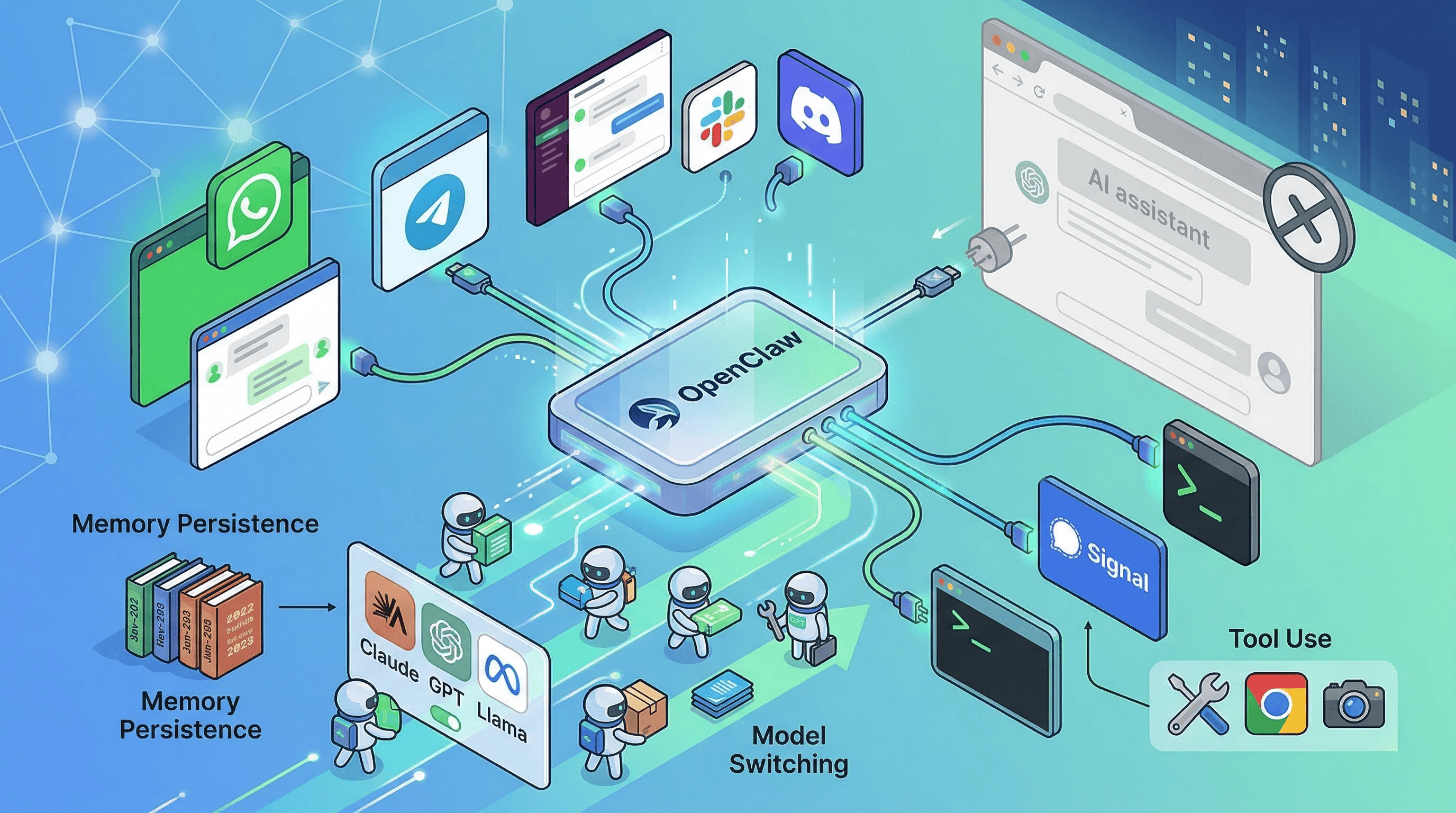
OpenClaw is a self-hosted gateway that connects AI agents to your messaging channels. WhatsApp, Telegram, Slack, Discord, Google Chat, Signal, iMessage, WebChat. Plus a browser Control UI and companion apps for macOS, iOS, and Android.
The GitHub repo has roughly 325k stars, which makes it one of the largest open-source AI projects out there. But the star count isn’t the interesting part. The interesting part is the architecture.
The Gateway is the single source of truth for sessions, routing, and channel connections. It embeds the Pi SDK directly instead of shelling out to a subprocess, which lets it inject custom tools, tune prompts by context, persist sessions, rotate auth profiles, and switch model providers on the fly. On top of that, ACP (Agent Communication Protocol) lets it hand work off to external coding-agent runtimes when that makes more sense.
In plain English: OpenClaw is not one model with one UI. It’s a routing and orchestration layer that sits above models, tools, channels, and state. The assistant is the product. The Gateway is the infrastructure.
Why this is different from browser-based AI#
I wrote about Open WebUI recently. Open WebUI moves the AI interface from a vendor’s SaaS into your own self-hosted browser workspace. That’s valuable. But OpenClaw takes a different bet entirely.
Open WebUI says: “The browser is the right interface. You just shouldn’t rent it from OpenAI.”
OpenClaw says: “The browser isn’t the right interface at all.”
That’s a much bolder claim. And honestly, when you think about how people actually interact with technology throughout the day, it makes sense. You’re not sitting in front of a browser all day. You’re in WhatsApp with your family and friends, in Slack with your org, in Telegram with your communities. The browser tab is where you go when you have a dedicated task. Messaging is where you live.
An AI assistant that lives in your messaging layer can do things a browser tab can’t. It can remind you about something at 3pm without you opening an app. It can respond in a group chat where multiple people are coordinating. It can wake up on a schedule and check something for you. It’s persistent in a way that a browser session never is.
What it can actually do#
The capability surface is broader than “AI in WhatsApp.” Five things matter.
It lives where you are. WhatsApp, Telegram, Slack, Discord, Google Chat, Signal, iMessage. You message it like you’d message a person. It responds in the same channel. It works across devices because the Gateway is always running.
It can switch models on the fly. The docs list 35+ providers: Anthropic, OpenAI, Google, OpenRouter, Ollama, vLLM, and any OpenAI-compatible or Anthropic-compatible endpoint. You can route different conversations to different models. Need a quick answer? Local model. Need deep reasoning? Claude. Same conversation thread, different backends.
It can do things, not just answer questions. The tool inventory includes command execution, browser automation, web search, image and PDF handling, cron jobs, and device node controls. The distinction between cron jobs and heartbeat turns is important: it can both run scheduled tasks and periodically wake itself up to surface something relevant. This isn’t autocomplete. This is an agent with hands.
It remembers. Memory is Markdown files in the workspace. Daily logs in memory/YYYY-MM-DD.md, curated long-term memory in MEMORY.md, exposed through memory_search and memory_get. Sessions can be isolated per agent, workspace, peer, or channel. The fact that memory is plain files you can inspect and edit is philosophically consistent with the local-first story and way more transparent than the hidden memory layers in ChatGPT or Claude.
It can extend itself. ClawHub is the public skill registry. Skills are instruction bundles built around SKILL.md files, while tools are typed capabilities the agent gets to use. Discover, install, publish, version, update. The extension model feels like package management for agent capabilities.
How people actually use it#
The official showcase clusters around patterns that tell you exactly what OpenClaw is good for.
Browser automation without APIs. PR review feedback delivered in Telegram. School meal and grocery ordering. Accounting intake from emailed PDFs. Slack auto-support. Infrastructure and deployment work. Health assistants. 3D printer and home automation. Voice bridges. One person built and shipped an iOS app from Telegram.
The center of gravity is not generic Q&A. It’s persistent coordination across personal and work systems.
Independent anecdotes on Hacker News point the same direction. One user described using OpenClaw to recover and rebuild a media server, diagnose drive failure, and migrate 1.5TB of data. Another said it became a useful participant in a group chat, tracking personalities and helping the group plan together. These are anecdotes, not benchmarks. But they align: the real appeal is infrastructure, automation, and ongoing conversational context.
The hard truth about running it#
Here’s where I need to be honest, because the community is tired of puff pieces about OpenClaw and so am I.
Setup is real work. Node, API keys, permissions, channel configurations, operational judgment. This is not “download an app and start chatting.” It’s closer to setting up a production service. The people who love OpenClaw are comfortable with that. The people who bounce off it were expecting something simpler.
Local-only is possible but expensive. The docs are unusually blunt about this. OpenClaw expects large context windows and strong prompt-injection resistance. It recommends the strongest latest-generation model available. Serious local setups may require hardware on the level of multiple maxed-out Mac Studios or equivalent GPU rigs. That’s a big reality check against the “runs privately on my old laptop” narrative.
Token costs can surprise you. Users report it’s easy to accidentally create expensive workflows, especially with naive model defaults. An always-on assistant that wakes up on schedules and processes conversations across multiple channels burns tokens constantly. Without cost controls, your monthly bill can go places you didn’t expect.
The security model is honest but limited. The supported posture is one trusted operator boundary per gateway. This is not hostile multi-tenant isolation. OpenClaw ships a security audit CLI, publishes a MITRE ATLAS-based threat model with 37 identified threats (6 critical), and added VirusTotal scanning for published skills. A high-severity CVE was patched in February 2026. The project is actively fixing real vulnerabilities, which is a good sign. But the docs are explicit that none of this makes the system “secure in all respects.”
Skills are code running in your agent’s context. This is the deepest concern. Skills have access to tools and data. The project’s own security documentation explicitly lists risks: exfiltration, unauthorized commands, sending messages on your behalf, downloading external payloads. You are not installing a chatbot. You are delegating action to an always-on agent with real permissions. Treat it accordingly.
Who’s behind it#
Peter Steinberger is the creator. The project credits Mario Zechner as the creator of Pi (the underlying agent framework) and names several core contributors. It’s MIT licensed.
There’s an interesting governance story here. Steinberger’s blog says he joined OpenAI on February 14, 2026, and that OpenClaw would move to a foundation while remaining open and independent. I found the announcement but not enough public material to treat the foundation transition as fully completed. Worth watching.
The naming history is also telling. The project went through multiple names. Anthropic asked them to reconsider the earlier “Clawd” branding. It went through “Moltbot” before landing on “OpenClaw.” That chaotic evolution says something about how fast this space moves and how young the project still is, despite its star count.
How it compares to the incumbents#
Versus ChatGPT. ChatGPT gives you a polished hosted product with Projects, scheduled Tasks, and MCP-based custom apps. OpenClaw gives you self-hosting, provider neutrality, and an assistant that lives in your own messaging channels instead of OpenAI’s browser product. ChatGPT wins on zero-ops convenience. OpenClaw wins on control and communication surface.
Versus Claude. Claude now bundles Projects, Artifacts, Research, and Skills inside Anthropic’s managed environment. That makes it the best native Claude experience. OpenClaw is interesting when you want Claude-level intelligence inside your own channels and control plane rather than inside Anthropic’s product. Different layer, different bet.
Versus Gemini. Gemini’s advantage is ecosystem gravity. Deep Research across Search, Gmail, Drive, NotebookLM. OpenClaw’s advantage is ecosystem neutrality. It sits above many providers and your own devices instead of locking the assistant layer to Google.
How it compares to open-source alternatives#
OpenClaw spans two categories that are usually separate, which makes direct comparisons tricky.
Open WebUI and LibreChat are stronger as self-hosted browser-based AI workspaces. They unify providers, support agents and MCP, and feel like replacements for the mainstream chat products. OpenClaw’s bet is different: move the assistant out of the browser entirely and into your messaging stack, with an always-on gateway and device nodes.
n8n sits on the other flank as an automation platform. Stronger for deterministic workflows, visual orchestration, and integration breadth. OpenClaw is stronger when you want a persistent assistant you can casually message, with memory, channel presence, and agent-like coordination. n8n automates flows. OpenClaw tries to become the thing you talk to.
What this means#
The broader pattern is the same one I see across AI tooling right now. The model layer is commoditizing. The interface layer is where the real fight happens. And the interface layer is splitting into at least three bets:
Vendor-hosted SaaS (ChatGPT, Claude, Gemini). Maximum convenience, minimum control. The default for most teams today.
Self-hosted browser workspaces (Open WebUI, LibreChat). Same browser paradigm, but you own it. The infrastructure play.
Communication-layer agents (OpenClaw). Not a workspace at all. An assistant that lives where you already are. The most radical bet.
OpenClaw is the most ambitious of the three. It’s also the highest-maintenance, the highest-risk, and the one that requires the most trust. You’re not just self-hosting a UI. You’re running an always-on agent with real permissions inside your real communication channels.
For power users and tinkerers who are comfortable with that, OpenClaw is one of the most interesting projects in the AI space right now. For everyone else, it’s worth understanding as a signal of where AI assistants are heading. Even if you never install it, the question it raises is the right one: why does your AI assistant live in a browser tab when you don’t?
Running personal AI agents? Tried OpenClaw or something similar? I’d love to hear your setup. Find me on X or Telegram.