

GitHub has launched linter integration for Copilot code review in public preview, enabling the AI assistant to surface actionable feedback from popular static analysis tools during pull request reviews. The feature is available to paid GitHub users and brings automated code quality checks directly into Copilot’s review workflow.
Three Static Analysis Tools Join the Mix#
Building on the CodeQL quality detections announced at GitHub Universe 2025, Copilot code review now integrates with two additional static analysis tools:
ESLint highlights issues in JavaScript and TypeScript projects, catching common patterns and potential bugs before they reach production. PMD scans for problems in Java, Apex, and other supported languages, expanding Copilot’s reach into enterprise codebases.
CodeQL remains enabled by default for public preview participants, providing semantic code analysis that catches security vulnerabilities and quality issues across multiple programming languages.
Granular Control Through Repository Rules#
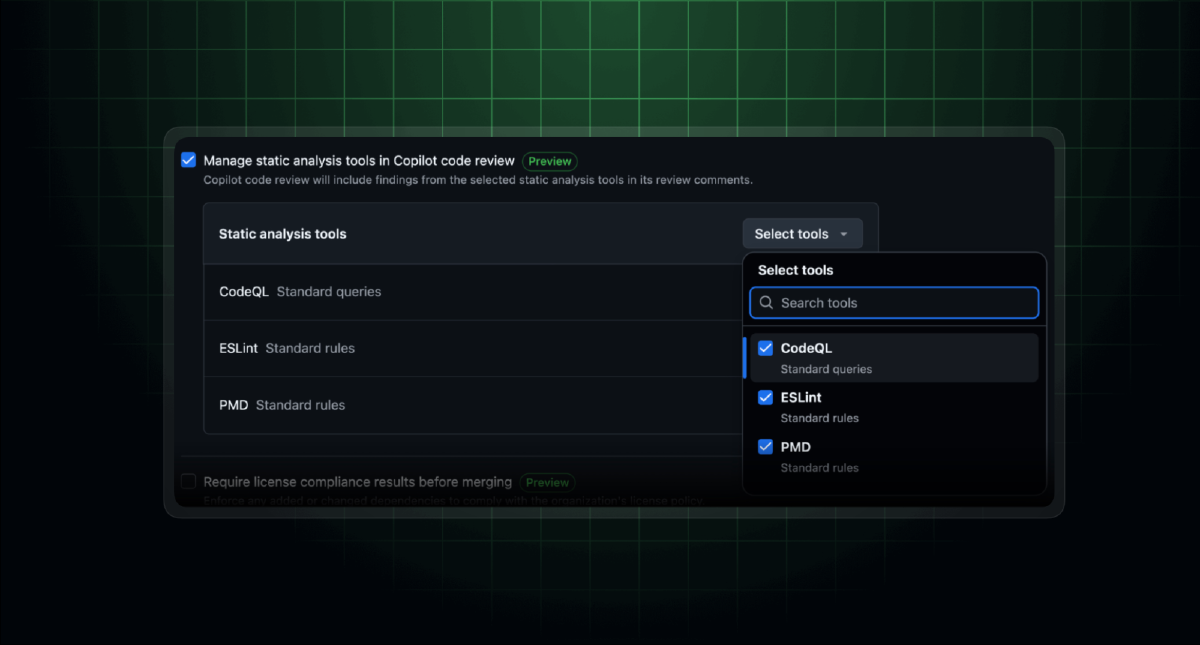
GitHub has introduced a new repository rule—“Manage static analysis tools in Copilot code review”—that gives teams fine-grained control over which tools participate in code reviews. Administrators can enable or disable CodeQL, ESLint, and PMD independently, tailoring the review experience to their project’s specific needs.
The rule supports enforcement at multiple levels: Enterprise, Organization, Team, or Repository. Teams can also configure specific branch and repository targeting, ensuring the right tools run on the right code.
Getting Started#
Setting up the integration requires admin access to a repository:
- Navigate to Settings > Rules > Rulesets
- Create or edit a ruleset and select the new static analysis tools rule
- Choose which tools—ESLint, PMD, and/or CodeQL—should participate in reviews
- Save and open a new pull request to see the updated Copilot code review in action
Catching What AI Might Miss#
The integration addresses a common pain point in AI-assisted code review: while large language models excel at contextual understanding and suggesting improvements, they can miss the deterministic issues that linters catch reliably. By combining Copilot’s AI capabilities with established static analysis tools, GitHub aims to ensure “the small stuff is never missed” during reviews.
The feature represents GitHub’s continued investment in making Copilot a comprehensive development assistant rather than a single-purpose tool—bridging AI intelligence with proven code quality automation.